

TL;DR:
- Setting up an AI chatbot helps automate customer engagement and reduces manual workload for small and medium businesses.
- Successful implementation depends on clear goal definition, organized content, and reliable fallback protocols before platform configuration.
AI chatbot setup is the process of configuring an intelligent conversational agent to automate customer engagement and reduce manual workload for your business. For small and medium-sized businesses, this technology represents one of the most direct paths to 24/7 customer service without hiring additional staff. Platforms like AIFlowChat, CustomGPT.ai, and WebDialogAI have made this process accessible to non-technical founders. This ai chatbot setup guide walks you through every stage, from choosing the right platform to launching a live bot and avoiding the mistakes that derail most first attempts.
What tools and platforms do you need for AI chatbot setup?
The first decision in any step by step chatbot setup is choosing the right type of chatbot technology. Rule-based chatbots use if/then logic and button menus, making them predictable but rigid. AI-powered chatbots understand natural language using large language models, which means they handle open-ended questions far better. Hybrid systems combine both approaches, using AI for intent recognition and rule-based flows for structured tasks like booking or order tracking.
Platform choice depends heavily on your technical skills and business goals. No-code and low-code platforms like Landbot, HubSpot, and CustomGPT.ai offer visual builders that require zero coding. OpenAI API-based bots deliver more customization but require developer involvement. For most SMBs, no-code platforms deliver 90% of the value at a fraction of the cost and complexity.
Here is a quick comparison of platforms suited for SMBs in 2026:
| Platform | Type | Technical Skill Required | Best For |
|---|---|---|---|
| AIFlowChat | AI-powered, no-code | None | Fast document-trained bots |
| CustomGPT.ai | AI-powered, no-code | None | FAQ and knowledge base bots |
| WebDialogAI | AI-powered, low-code | Minimal | Website customer service |
| Landbot | Hybrid, no-code | None | Lead generation flows |
| HubSpot | Rule-based, no-code | None | CRM-integrated support bots |
Before you sign up for any platform, gather your prerequisites. You need access to your website's backend or CMS, a compiled knowledge base (FAQ documents, policy PDFs, product pages), and clarity on which customer tasks you want the bot to handle.
Pro Tip: Use a tool like Blueprint AI's tech stack finder to compare platform options against your specific business goals and technical capacity before committing to a subscription.
How do you prepare your business content for the chatbot?
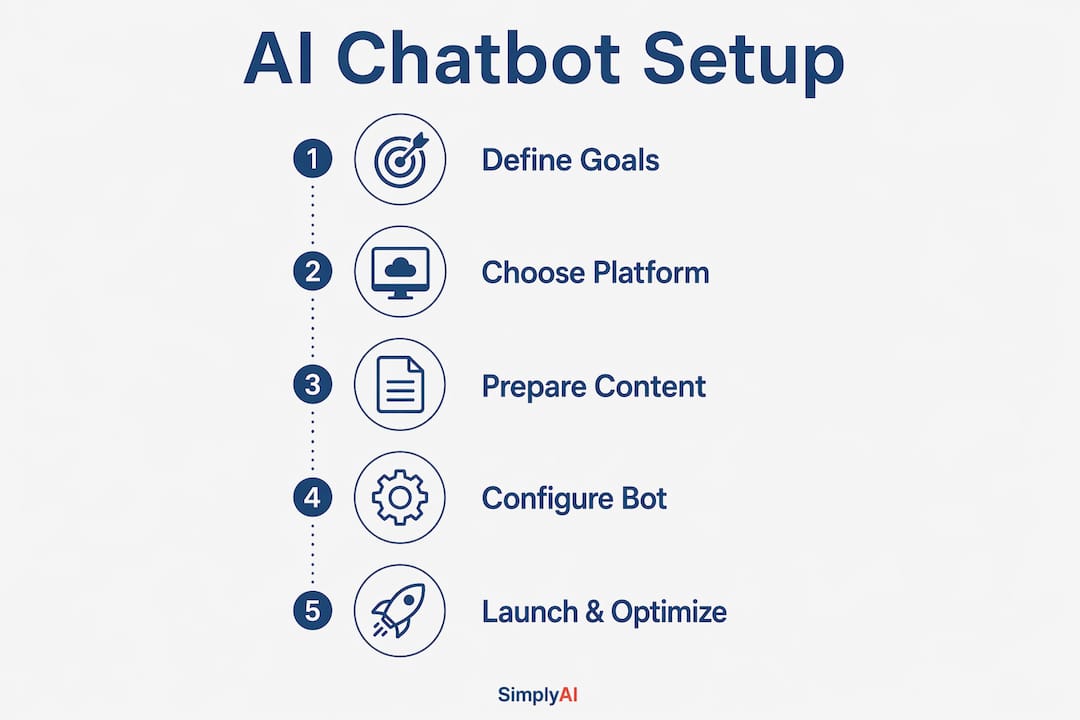
Content preparation is where most SMB chatbot projects succeed or fail. Defining narrow, specific goals before building, such as handling order tracking or answering product FAQs, prevents bloated conversation flows that confuse both the AI and your customers. A chatbot trying to do everything ends up doing nothing well.

Your knowledge base is the foundation the AI learns from. Organize your content sources into clear categories: website URLs, PDF documents, FAQ spreadsheets, return policy files, and pricing pages. The AI platform will crawl and index these sources during the training phase. The quality of what you feed in directly determines the quality of answers the bot produces.
Manual review after ingestion is non-negotiable. AI platforms sometimes misinterpret complex layouts like pricing tables, multi-column lists, and nested FAQs, producing inaccurate answers as a result. A 30-minute manual audit of your ingested content catches the majority of these errors before they reach customers.
Common content sources to prepare and audit:
- FAQ documents: Export from your helpdesk or write fresh Q&A pairs in plain text format.
- Product or service pages: Provide direct URLs so the crawler captures current pricing and descriptions.
- Policy files: Upload return, shipping, and privacy policies as clean PDFs without complex formatting.
- Pricing tiers: Flatten tables into simple text lists to avoid AI misinterpretation of column structures.
Pro Tip: Schedule a monthly knowledge base audit. Products change, policies update, and prices shift. An outdated knowledge base is the single fastest way to erode customer trust in your chatbot.
What are the step-by-step configuration and launch instructions?
A well-structured AI chatbot configuration process follows a clear sequence. Simple chatbots can be configured in under 20 minutes using platforms like CustomGPT.ai, and AIFlowChat deploys document-trained bots in under 5 minutes without developer help. Speed is possible, but only when your content is already organized.
Follow these steps to go from account creation to a live chatbot:
- Create your account on your chosen platform and complete the onboarding wizard.
- Connect your data sources by entering website URLs or uploading PDF and FAQ documents for AI ingestion.
- Configure your greeting message to set clear expectations. Tell users what the bot can and cannot help with.
- Set up fallback protocols with a human handoff option. A message like "I'm not sure about that. Email us at support@yourcompany.com or I can connect you to a team member" maintains trust when the bot reaches its limits.
- Customize the widget by adjusting position (bottom right is standard), brand colors, and pre-chat form fields if you need to capture a name or email before the conversation starts.
- Add quick reply buttons for your most common questions to reduce friction and guide users toward useful answers faster.
- Test in the dashboard preview by simulating real visitor questions, including edge cases and unusual phrasing.
- Embed the widget into your website. Embedding typically involves copying a single JavaScript snippet into your site's HTML, or using a CMS plugin for WordPress or Shopify.
- Run live simulations with real team members acting as customers before the public launch.
- Go live and monitor the first 48 hours of conversations closely for unexpected failures or gaps.
The embedding step deserves extra attention. For WordPress, most platforms offer a dedicated plugin that handles the script injection automatically. For Shopify, you paste the snippet into the theme's theme.liquid file. For custom HTML sites, the snippet goes just before the closing </body> tag. Understanding your CMS's specific theme files prevents deployment errors and ensures the widget appears correctly across devices.
Pro Tip: Always include a fallback message with direct contact information. Clear fallback protocols are the primary differentiator between chatbots that build customer trust and those that destroy it.
What are the most common mistakes in AI chatbot setup?
The most damaging mistake in creating an AI chatbot is starting with technology instead of goals. Many businesses choose a platform first and then try to reverse-engineer a use case, which produces unfocused bots that frustrate users. Define the specific customer task the bot must handle before you open a single platform dashboard.
The second most common failure is skipping the knowledge base audit. Raw ingestion of poorly formatted documents produces AI responses that are confidently wrong. Confident inaccuracy is far more damaging to customer trust than a bot simply saying it does not know the answer.
Neglecting fallback and escalation mechanisms is the third critical error. A chatbot with no exit path traps users in loops and generates negative brand experiences. Every conversation flow needs a clear off-ramp to a human agent or a direct contact method.
"The primary differentiator between successful and failing chatbots is effective hallucination control and fallback protocols, ensuring accurate responses or smooth human handoffs." — TBH Research, 2026
Skipping pre-launch testing is the fourth mistake. Testing only in the platform's preview mode misses real-world edge cases. Have team members with no knowledge of the bot's configuration test it cold, asking questions in unexpected ways.
Post-launch, continual optimization is required. Monitor conversation logs weekly, identify where users drop off or express frustration, and update your knowledge base accordingly. A chatbot is not a set-and-forget tool. It is a living system that improves with consistent attention.
For troubleshooting AI hallucinations specifically, the fix is almost always in the knowledge base. Locate the source document for the inaccurate answer, rewrite the relevant section in plain, unambiguous language, and re-ingest it. Ambiguous source content produces ambiguous AI answers every time.
Key takeaways
Effective AI chatbot setup requires defined goals, clean content, and a reliable fallback protocol before any platform configuration begins.
| Point | Details |
|---|---|
| Define goals first | Narrow, specific use cases like order tracking produce far better results than broad, open-ended scopes. |
| Audit your knowledge base | Manually review ingested content to catch formatting errors that cause inaccurate AI responses. |
| Build fallback protocols | Every conversation flow needs a human handoff or direct contact option to maintain customer trust. |
| Embed correctly by CMS | WordPress, Shopify, and custom HTML each require a different embedding method to avoid deployment errors. |
| Optimize continuously | Monitor conversation logs weekly and update your knowledge base to improve accuracy over time. |
What i've learned after setting up dozens of SMB chatbots
Most business owners I work with arrive at chatbot setup with the same misconception: they believe the platform does the heavy lifting. The platform is just the container. The real work is in the content, the goal definition, and the fallback design.
The projects that deliver results share one trait. The business owner spent time before touching any platform to write down exactly three things: the specific customer questions the bot must answer, the actions it must trigger, and the point at which it should hand off to a human. That 30-minute exercise prevents weeks of rework.
The projects that struggle share a different trait. The owner uploaded a 200-page product catalog, set the bot live, and expected it to handle everything. It cannot. No chatbot can. The AI chatbot advantages for business are real and significant, but they materialize only when the scope is honest and the content is clean.
My honest recommendation: start with one use case, get it working well, and then expand. A chatbot that handles FAQ responses with 95% accuracy is worth more than one that attempts 20 tasks at 60% accuracy. Businesses that treat chatbot setup as an ongoing practice rather than a one-time project consistently outperform those that treat it as a deployment checkbox.
— Theodor
Ready to set up your AI chatbot with expert support?
Setting up an AI chatbot is achievable for any SMB, but the difference between a bot that performs and one that frustrates customers often comes down to the details covered in this guide. Simplyai specializes in designing and deploying AI automation solutions for small and medium-sized businesses, including AI-powered chatbots, workflow automation, and CRM integrations. If you want a chatbot that is configured correctly from day one, with proper fallback protocols and a clean knowledge base, Simplyai's team handles the full process.

Explore how Simplyai's AI chatbot services can reduce your customer service workload and improve response quality. Businesses that act now build the operational advantage that compounds over time.
FAQ
How long does AI chatbot setup take?
Simple chatbots can be configured in under 20 minutes using no-code platforms like CustomGPT.ai. More complex setups with custom conversation flows and large knowledge bases typically take 2–5 hours.
How much does an AI chatbot cost for a small business?
Most small businesses pay $20–$150 per month for chatbot services, with some platforms offering free tiers and initial setup fees ranging from free to $500. No-code platforms generally fall at the lower end of that range.
Do i need a developer to set up an AI chatbot?
No-code platforms like AIFlowChat, Landbot, and CustomGPT.ai require no developer skills. Embedding the widget involves copying a single JavaScript snippet into your site's HTML or using a CMS plugin.
What is the most important step in AI chatbot configuration?
Defining a narrow, specific use case before selecting a platform is the most critical step. Experts consistently identify goal definition as the factor that separates successful chatbot deployments from failed ones.
How do i improve my chatbot after launch?
Monitor conversation logs, collect user feedback, and update your knowledge base on a regular schedule. Fixing inaccurate answers at the source document level is the most effective method for reducing AI hallucinations over time.