

TL;DR:
- Business process optimization can boost SMB productivity by up to 50 percent.
- Proper mapping and analysis before automation prevent costly failures and scaling errors.
- Continuous improvement of workflows creates durable efficiency and competitive advantages.
Most SMB owners assume their biggest growth lever is sales or marketing. But productivity gains of up to 50% are sitting inside operations that nobody has ever formally examined. The truth is that the most overlooked source of competitive advantage is not a new product or a bigger ad budget. It's the way work actually gets done every day. This guide cuts through the noise and shows you exactly how to identify, improve, and then automate your core business processes using practical AI tools that deliver measurable results.
Table of Contents
- What does optimizing business processes mean?
- Evidence-backed benefits: Productivity, revenue, and cost reduction
- The right sequence: Map, analyze, improve before automating
- Common pitfalls and edge cases: When optimization goes wrong
- AI: Bitter lesson vs. Garbage Can, different approaches to automation
- Our take: Why you shouldn't rush process automation, even with smart AI
- Take your next step: AI superpowers for SMB optimization
- Frequently asked questions
Key Takeaways
| Point | Details |
|---|---|
| Boost productivity fast | Optimizing business processes can deliver up to 50% productivity gains for SMBs. |
| Cut operating costs | Hyperautomation and redesign may reduce costs by as much as 30%. |
| Don’t skip mapping | Processes must be mapped and analyzed before automation to avoid scaling failures. |
| Beware over-optimization | Excess optimization and poor documentation can make workflows rigid and prone to AI errors. |
| Choose your AI approach | Decide whether to let AI self-learn or guide it with explicit models based on process complexity. |
What does optimizing business processes mean?
Process optimization is the discipline of examining how work flows through your organization and then systematically improving that flow to eliminate waste, reduce errors, and produce better outcomes consistently. For SMBs, this is not an abstract corporate exercise. It is the difference between a customer inquiry that gets answered in two hours versus two days, or an invoice that takes twelve steps when four would do.
At its core, business process optimization means mapping every task within a given workflow, identifying which steps add genuine value, and removing or redesigning the ones that don't. The three primary benefits are efficiency (doing more with the same resources), consistency (delivering the same quality every time), and customer experience (giving clients faster, more reliable outcomes).
Consider a simple before-and-after example. A small e-commerce company's order fulfillment process originally involved five different team members manually copying information between a spreadsheet, an email client, and a warehouse tool. After optimization, a single automated trigger captured the order data, routed it to the warehouse, and sent the customer a tracking update without human intervention. Error rates dropped by 80%, and the team reclaimed nearly two hours of daily labor. That is the kind of real-world gain that workflow optimization for SMBs consistently produces.
"Optimizing business processes can boost productivity by up to 50% and increase revenue per employee by 40% for small and medium-sized businesses."
The revenue angle is particularly striking. More productive employees generate more output per dollar of labor cost, which directly widens margins. For SMBs operating on tight budgets, that margin expansion can be the difference between surviving a slow quarter and thriving through it. Reviewing AI integration examples from comparable businesses is one of the fastest ways to identify where similar gains are possible in your own operations.
Evidence-backed benefits: Productivity, revenue, and cost reduction
With the terms clear, let's look at what the numbers say about the real business impact of process optimization. The data is consistently compelling across industries.
Hyperautomation combined with process redesign can lower operating costs by up to 30%. That figure refers not just to cutting headcount but to eliminating redundant software subscriptions, reducing error-correction labor, and shortening cycle times that tie up working capital. When paired with the 50% productivity increase figure cited earlier, the combined effect on an SMB's bottom line can be transformative within a single fiscal year.

| Metric | Before optimization | After optimization | Improvement |
|---|---|---|---|
| Productivity per employee | Baseline | Up to 50% higher | Significant |
| Revenue per employee | Baseline | Up to 40% higher | Substantial |
| Operating costs | Baseline | Up to 30% lower | Major |
| Error rate in core workflows | High (manual) | Dramatically reduced | Critical |
| Customer response time | Hours to days | Minutes to hours | Measurable |
These are not hypothetical projections. They represent outcomes observed in SMBs that committed to structured process improvement before layering in automation tools. The sequence matters enormously, which is explored in the next section.
The measurable outcomes SMBs most commonly report after optimization include faster turnaround on customer-facing tasks, reduced overtime costs from error correction, higher staff satisfaction due to fewer repetitive tasks, improved data accuracy across CRM and financial systems, and a clearer picture of which activities actually drive revenue. Reviewing automation tips for SMBs can help prioritize which of these outcomes to pursue first based on your specific industry.
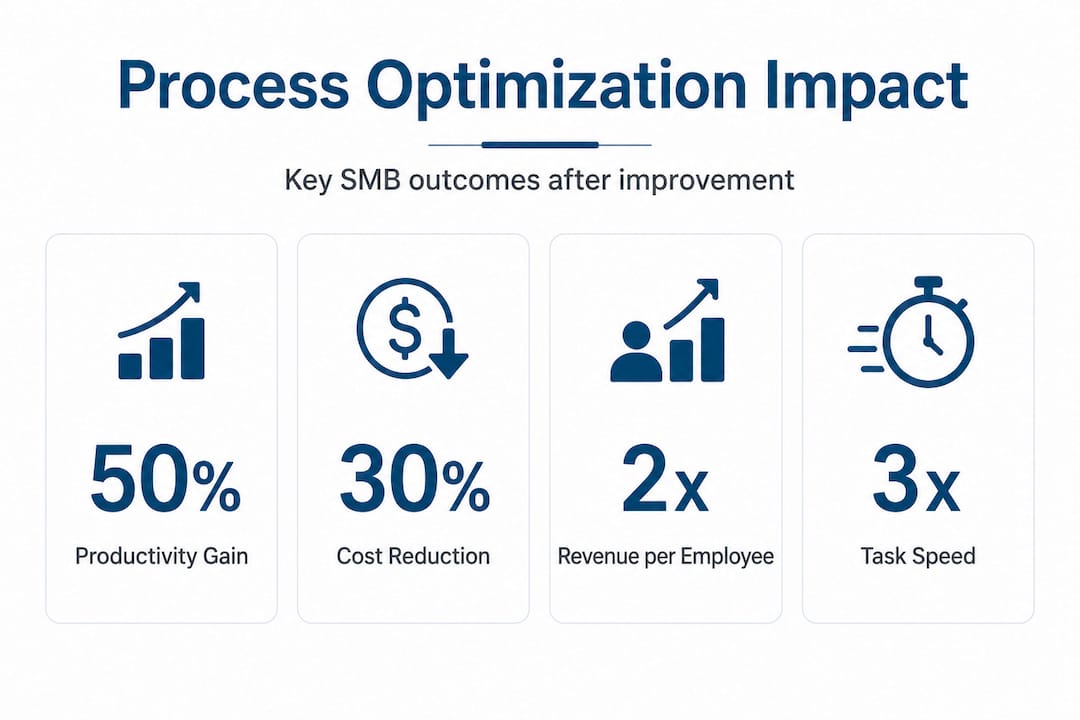
The key insight from this data is that optimization is not a one-time project. It's an ongoing discipline. SMBs that treat it as a continuous practice rather than a single initiative tend to compound their gains over time, creating a structural efficiency advantage over competitors who rely on hiring more people to handle growing workloads. The AI workflow automation guide provides a practical framework for maintaining that momentum.
The right sequence: Map, analyze, improve before automating
Before you jump into automation, you need to know why starting with optimization rather than automation matters. This is one of the most consequential mistakes SMB leaders make: they see a bottleneck, grab an automation tool, and deploy it without first understanding why the bottleneck exists.
The consequence? You automate a broken process and it breaks faster and at greater scale. Industry experts are direct about this: never automate a broken process. Map and analyze first, then improve, then automate. That sequence is not optional. It is the foundation of every successful digital transformation.
The proven optimization sequence works as follows:
- Map the current process. Document every step, every decision point, and every handoff. Use flowcharts or simple process mapping tools. The goal is to make the invisible visible.
- Analyze for waste and friction. Identify which steps are redundant, which cause the most errors, and which take the longest relative to their contribution. Look at where work gets stuck, lost, or duplicated.
- Involve frontline staff. The people doing the work daily know where the real pain points are. Their input is not optional background noise. It is primary research data.
- Redesign the process. Remove unnecessary steps, simplify handoffs, and standardize decision rules. Write the improved process down in explicit language before touching any technology.
- Automate the improved process. Only after the redesigned workflow is validated should automation enter the picture. Apply AI tools to steps that are repetitive, rule-based, and well-documented.
This sequence is why workflow optimization for SMBs consistently outperforms approaches that lead with technology. The tool should serve the process, not define it.
Pro Tip: Before selecting any automation software, create a written "process passport" for each workflow you plan to automate. This document includes the process owner, every step in sequence, expected inputs and outputs, and known failure points. Staff who contributed to the process should review and sign off before automation begins. This single practice prevents the majority of costly post-automation fixes.
Real-world AI workflow examples consistently show that businesses that follow this sequence achieve automation ROI two to three times faster than those that skip the mapping and analysis phases.
Common pitfalls and edge cases: When optimization goes wrong
Even the best-laid plans can run into edge cases. Understanding where optimization efforts typically fail is as important as knowing the steps to success.
The most common pitfalls observed in SMB optimization projects include the following:
- Over-optimization creates rigidity. When processes are engineered too tightly, they lose the flexibility to handle exceptions. A customer with an unusual request hits a wall because the workflow was built for the average case only. Some degree of human judgment must be preserved in any automated system.
- AI hallucinations and false clarity. Large language models (LLMs) can generate plausible-sounding process documentation that is factually wrong or internally inconsistent. Using AI to map processes without human verification introduces errors that compound downstream.
- Undocumented tribal knowledge. Many critical business decisions live in the heads of long-tenured employees, not in any system or document. When these people are not consulted during the mapping phase, the resulting process map is incomplete and the automation built on it will fail at the edges.
- Automating bad processes speeds failure. This point deserves repetition. Automation amplifies whatever is already there. If the underlying process is flawed, automation makes the flaw faster and more frequent.
- Insufficient troubleshooting after automation. Launching an automated workflow is not the finish line. Without monitoring, logging, and scheduled reviews, errors accumulate silently until a customer or financial outcome surfaces the problem.
"Edge cases are not rare exceptions. They are the stress test that reveals whether your optimization was genuine improvement or just reorganized complexity." Industry practitioners consistently observe that addressing these edge cases early is what separates durable efficiency gains from fragile ones.
The AI agent guide for SMB leaders discusses how AI agents can be configured to flag edge cases autonomously, reducing the burden on staff while maintaining process integrity. That capability is particularly valuable for SMBs that don't have dedicated operations or IT teams monitoring workflows around the clock.
AI: Bitter lesson vs. Garbage Can, different approaches to automation
How you approach automation depends on whether you see AI as a self-optimizing tool or something that needs clear instructions. Two influential frameworks from the AI research community offer contrasting answers, and both have direct implications for SMB leaders.
The Bitter Lesson, articulated by AI researcher Rich Sutton, holds that AI systems learn best by scaling computation and exposure to large volumes of examples rather than by encoding human-designed rules. The implication for automation is that sufficiently powerful AI can navigate messy processes autonomously if given enough data and computing resources.
The Garbage Can model, drawn from organizational theory, describes how real business processes work: decisions happen chaotically, participants and priorities shift constantly, and the underlying logic is rarely as clean as any flowchart suggests. This model argues that messy organizational processes require explicit mapping and structure before AI can add reliable value. AI, in this framing, exposes the flaws in a process rather than fixing them.
| Dimension | Bitter lesson approach | Garbage Can approach |
|---|---|---|
| Core assumption | AI learns from scale and data | Processes need explicit structure |
| Best suited for | Large datasets, clear success metrics | Complex org workflows, high variability |
| Risk for SMBs | Requires data volume most SMBs lack | Requires upfront mapping investment |
| AI role | Self-navigating, adaptive | Tool that executes defined logic |
| Failure mode | Black box decisions, audit gaps | Over-engineering simple tasks |
For most SMBs, the practical answer combines both perspectives. AI tools should be given clear process maps and decision rules (Garbage Can) while also being allowed to surface patterns in data that humans would miss (Bitter Lesson). Reviewing examples of AI in workflow contexts shows how this hybrid works in practice. The key for SMB leaders is knowing which approach governs each specific task, rather than applying one philosophy uniformly across all operations.
Our take: Why you shouldn't rush process automation, even with smart AI
After examining both the data and the theoretical frameworks, a candid observation emerges: the businesses that gain the most from AI automation are almost never the ones that moved fastest. They are the ones that moved most deliberately.
The prevailing narrative in technology media suggests that SMBs need to adopt AI immediately or risk being left behind. That urgency is real, but it is frequently misdirected. Deploying a large language model on top of an undocumented, inconsistently followed process does not accelerate the business. It accelerates confusion.
What careful mapping reveals, before any automation tool is introduced, is often more valuable than the automation itself. The act of documenting a process forces clarity. It surfaces assumptions that no one has questioned for years. It identifies the invisible knowledge that only two or three people in the company actually hold. That knowledge, once documented, becomes an organizational asset that exists independently of any single employee.
Scaled failures in process automation almost always trace back to the same root cause: the organization treated the AI tool as the solution rather than as an amplifier of an already-sound process. Rigidity follows from over-automation that was never tested against real-world edge cases. Scaling errors emerge when a process that worked manually at low volume is automated and then breaks visibly at high volume.
The insider automation tips that consistently prove most valuable are not about which software to choose. They are about how to prepare the organization before the software arrives. Involve the people who do the work daily. Write down what actually happens, not what is supposed to happen. Test with real data before going live. Review automated outputs weekly for the first 90 days.
Speed will come. But durability comes from doing the groundwork first, and that groundwork is what separates SMBs that automate successfully from those that automate expensively and then revert to manual processes six months later.
Take your next step: AI superpowers for SMB optimization
Ready to put these strategies to work? SimplyAI helps SMB owners move from scattered manual workflows to streamlined, AI-powered operations that actually hold up under real business conditions.

SimplyAI designs and implements AI automations for SMBs that are built on properly mapped and analyzed processes, not on guesswork. Whether you need AI-powered chatbots, CRM automation, or end-to-end workflow redesign, every solution starts with the process mapping phase that separates durable gains from costly mistakes. Businesses that want to deploy AI agents to streamline operations autonomously will find practical, tailored configurations that match their actual workflows. For leadership teams that want to build internal AI literacy before committing to automation, AI corporate education programs equip your staff with the knowledge to make smarter technology decisions from the ground up.
Frequently asked questions
Do I need to optimize before automating my business processes?
Yes. Improving processes before automation prevents scaling mistakes and maximizes ROI. Automating a broken process accelerates failure rather than fixing it, making the mapping and analysis phase non-negotiable.
How much can process optimization increase productivity?
SMB owners consistently see up to 50% higher productivity after optimizing workflows, along with revenue per employee gains of up to 40%, based on documented outcomes across industries.
Is automating every process always beneficial for SMBs?
No. Over-automation creates rigidity and can scale errors rapidly, especially when processes have not been mapped, analyzed, and improved before automation tools are introduced.
What's the difference between the Bitter Lesson and Garbage Can approaches to AI automation?
The Bitter Lesson trusts AI to learn through scale and data, while the Garbage Can approach requires detailed mapping of messy organizational processes before AI can deliver reliable results. Most SMBs benefit from a hybrid of both.