

TL;DR:
- Inefficient processes drain small business resources, but mapping workflows reveals hidden costs and areas for improvement. Combining clear process design with AI automation creates reliable, measurable efficiencies, especially when focusing on high-impact tasks. Successful automation depends on ongoing review, careful scope management, and distinguishing tasks suitable for humans versus AI.
Inefficient processes are one of the most expensive problems a small business can have, and most owners don't realize how much they're losing until they map it out. This workflow design guide exists to change that. When tasks fall through the cracks, handoffs get repeated, or your team spends hours on work that a well-configured automation could handle in seconds, growth stalls. The good news is that structured workflow design, paired with the right AI automation tools, gives you a repeatable path from chaos to clarity. This guide walks you through every stage: mapping what you have, building what you need, choosing the right technology, and improving it continuously.
Table of Contents
- Map your current workflows and set clear goals
- Design the automation: Triggers, rules, actions, and integrations
- Pick your approach: Rule-based, AI, or a hybrid workflow
- Build in safety and ensure continuous improvement
- What results to expect: Measurable productivity and common pitfalls
- Our take: The uncomfortable truth about workflow redesign for SMBs
- How SimplyAI empowers your workflow transformation
- Frequently asked questions
Key Takeaways
| Point | Details |
|---|---|
| Map first, automate later | Understand your process fully before adding technology or automation. |
| Choose automation wisely | Rule-based works for predictable steps while AI shines in tasks needing judgment. |
| Layer in safety checks | Include reviews, error handling, and logs to protect data and workflow integrity. |
| Expect task-dependent results | Productivity lifts are largest in text-driven processes; results may vary for others. |
| Continuous improvement is essential | Update and refine workflows regularly for lasting efficiency gains. |
Map your current workflows and set clear goals
Before any automation can deliver results, you need a clear picture of what actually happens in your business today. Not what's supposed to happen. What actually happens. That distinction matters more than most guides acknowledge, because the gap between the two is usually where the wasted time lives.
Start with a simple "as-is" process map. You don't need specialized software for this. A whiteboard, a sheet of paper, or a free tool like Miro or Lucidchart works fine. Asana's process mapping guidance emphasizes planning the scope and mapping with the right amount of detail, then updating the map after improvements as the foundation for a continuous improvement loop. The goal at this stage is not perfection. It's clarity.
When deciding how much detail to include, focus on pain points rather than every micro-step. If a task takes less than two minutes and never causes errors, it doesn't need deep documentation. If a handoff between two team members regularly causes delays or miscommunication, that deserves close attention.
A useful workflow map should capture four key elements:
- Triggers: What starts the process? A customer inquiry, a form submission, an invoice received?
- Actors: Who or what is responsible for each step? A person, a system, or both?
- Actions: What work gets done at each stage?
- Outcomes: What does a successfully completed process look like?
Once your map is built, define measurable goals before touching any automation tool. Useful metrics include cycle time (how long the process takes end to end), error rate, number of handoffs, and customer wait time. Without baseline numbers, you can't prove improvement. Exploring process optimization for SMB growth can help you identify which metrics matter most for your specific business type.
Pro Tip: Tackle one process at a time. Businesses that try to map and automate everything at once almost always stall. Pick the process that causes the most pain or costs the most time, fix it, measure the result, then move to the next one.
Design the automation: Triggers, rules, actions, and integrations
Now that you have a map and measurable goals, it's time to convert that paper process into an automated sequence. Every automated workflow, regardless of complexity, is built from the same four components.
Workflow automation mechanics follow a consistent pattern: a trigger starts the process, predefined rules guide what happens next, actions execute the work, and integrations connect the systems involved. Understanding this structure prevents the most common design mistake, which is building automation that works in isolation but breaks the moment data needs to move between tools.
Here's a practical numbered sequence for turning a mapped process into an automated one:
- Identify the trigger. What event should start the workflow? Examples include a new lead filling out a form, an invoice arriving by email, or a support ticket being marked urgent.
- Define the decision logic. What conditions determine what happens next? If the invoice is over a certain amount, it routes to a manager. If the lead came from a specific campaign, it gets tagged accordingly.
- Specify the actions. What should the system do automatically? Send an email, update a CRM record, create a task, generate a document?
- Map the integrations. Which tools need to talk to each other? Your CRM, your email platform, your accounting software, your project management tool?
- Test with real data. Run the automation using actual records from your business, not dummy data, to catch edge cases early.
| Component | What it does | Example |
|---|---|---|
| Trigger | Starts the workflow | New form submission |
| Rules/Logic | Determines the path | If lead score > 70, assign to sales |
| Actions | Executes the work | Send welcome email, create CRM contact |
| Integrations | Connects systems | CRM to email platform to Slack |
For practical implementation, reviewing automation tips for efficiency gives you a grounded starting point.
Pro Tip: Automate the handoffs between systems first. Copy-paste errors between tools are among the most common and costly mistakes in SMB operations. An API connection or a middleware tool eliminates them entirely.
Pick your approach: Rule-based, AI, or a hybrid workflow
With automation fundamentals in place, the next decision is which type of automation fits your process. This choice has a bigger impact on long-term reliability than most business owners expect.
Rule-based automation works by following fixed logic: if this happens, do that. It's fast, predictable, and easy to audit. Invoice routing, appointment reminders, and order confirmation emails are ideal candidates. The process is the same every time, and exceptions are rare.
AI-driven automation handles tasks that require interpretation. Prioritizing inbound leads based on email content, summarizing customer feedback, or categorizing support tickets by sentiment are tasks where large language models genuinely outperform rigid rules. Hybrid workflow approaches are often the most practical answer: use deterministic rule-based steps where the process is predictable, and introduce AI agent frameworks where judgment is required.
Consider these trade-offs before choosing:
- Rule-based: Fast to build, easy to audit, brittle when exceptions arise, requires manual updates as business rules change.
- AI/agentic: Handles ambiguity well, adapts to new patterns, harder to audit, and can produce unexpected outputs without proper guardrails.
- Hybrid: Combines reliability for structured steps with flexibility for complex ones, but requires more thoughtful design upfront.
| Process trait | Best fit |
|---|---|
| Highly structured, consistent | Rule-based |
| Judgment-heavy, text-based | AI/agentic |
| Mix of structured and fuzzy | Hybrid |
| Requires full audit trail | Rule-based or hybrid with logging |
| High exception rate | AI or hybrid |
Understanding the difference between AI automation and manual work helps clarify where automation genuinely adds value versus where human judgment remains irreplaceable. Similarly, reviewing automation types for SMBs gives you a sharper lens for matching technology to process type.
Build in safety and ensure continuous improvement
Choosing the right approach is only half the work. A workflow that runs without guardrails is a liability, not an asset. This is especially true for AI-enabled flows, where outputs can vary in ways that pure rule-based systems never would.

An edge-case checklist for AI-enabled workflows should include: clearly defined completion criteria so the workflow knows when to stop, iteration limits and timeouts to prevent runaway loops, tool restrictions that prevent AI agents from taking actions outside their intended scope, PII redaction to protect customer data, and human review checkpoints for high-stakes decisions.
For most SMBs, the practical safety layer looks like this:
- Human approval gates for actions that are irreversible or high-value (refunds, contract generation, large purchase orders).
- Logging and observability so you can trace exactly what happened when something goes wrong.
- Defined fallback paths for when the automation fails or encounters an unexpected input.
- Regular audits of automation outputs, not just the process itself.
"Never set-and-forget. Workflows must be reviewed and improved."
This is not a philosophical point. It's an operational one. Business conditions change, customer behavior shifts, and tools get updated. A workflow that was accurate six months ago may be producing errors today. Data-driven workflow decisions give you the framework to catch these drift patterns before they become costly problems.
What results to expect: Measurable productivity and common pitfalls
Having built and hardened your workflow, it's reasonable to ask: what should you actually expect?
The honest answer is that results are task-dependent. A ResearchSquare study with 320 participants found that AI produced significant productivity gains for text-heavy reading and writing tasks, including faster completion times and higher user satisfaction, while showing no meaningful benefit for other task types. This is a critical finding for SMBs. It means automation is not a universal accelerant. It's a precision tool.
Not every process deserves automation. Before investing time in building a workflow, ask whether the volume justifies the effort, whether the process is stable enough to automate reliably, and whether the errors it currently produces are actually costly. A process that runs twice a month with no errors is a poor candidate. A process that runs 200 times a day with a 5% error rate is an urgent one.
The most common pitfalls in workflow design follow a predictable pattern:
- Over-automating. Building complex automation for processes that are too infrequent or too variable to benefit from it.
- Ignoring edge cases. Designing for the happy path and discovering that exceptions account for 20% of real-world volume.
- No feedback loops. Launching automation and never measuring whether it actually improved anything.
- Skipping the baseline. Failing to record pre-automation metrics, which makes it impossible to prove ROI.
- Treating launch as completion. Automation requires ongoing maintenance, not a one-time build.
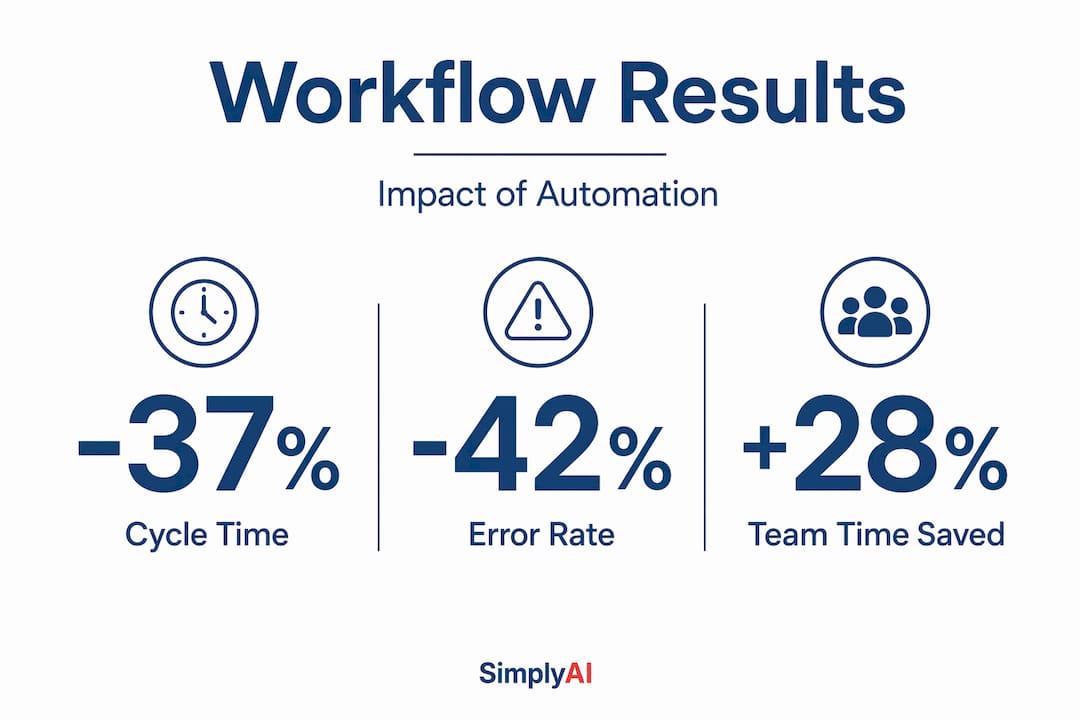
Monitor your key metrics before and after each change. Cycle time, error rate, and team time saved are the three numbers that tell you whether the investment was worth it. For businesses exploring adaptive AI approaches, the ability to measure and adjust in real time is what separates a successful automation program from an expensive experiment.
Our take: The uncomfortable truth about workflow redesign for SMBs
Most workflow automation guides present a tidy story: map your process, add automation, watch productivity soar. The reality is messier, and the businesses that succeed are the ones who understand why.
The biggest wins we see consistently come not from the automation itself but from the mapping exercise that precedes it. When a business actually documents what's happening, they almost always discover redundant steps, unclear ownership, and processes that exist purely out of habit. Removing those manually, before any automation is introduced, often produces faster results than the automation itself.
The second uncomfortable truth is that automation can multiply problems as easily as it multiplies efficiency. A flawed process that runs manually ten times a day becomes a flawed process that runs automatically a thousand times a day. Speed without accuracy is not a win.
Businesses that approach workflow optimization step by step with patience and specificity consistently outperform those chasing a single transformative launch. Success in this space is built on accumulated small wins: one process improved, measured, and stabilized before the next one is touched. That approach feels slower at the start. It compounds dramatically over time.
The final truth is about scope. Knowing what not to automate is as valuable as knowing what to automate. Processes that require empathy, nuanced judgment, or relationship management are often better left in human hands, at least until AI agent frameworks mature further. The businesses that thrive are the ones that make that distinction clearly and revisit it regularly.
How SimplyAI empowers your workflow transformation
Designing and implementing effective workflow automation requires more than a good plan. It requires the right technical foundation, the right tools, and the experience to avoid the pitfalls that derail most first attempts.

SimplyAI works with small and medium-sized businesses to map their existing processes, identify the highest-value automation opportunities, and build solutions that deliver measurable results. Whether you need AI automations for your core operations, AI agents that handle judgment-based tasks autonomously, or AI corporate education to build your team's capability from the inside out, the path forward starts with a clear-eyed assessment of where you are today. If your workflows are costing you more than they're saving, now is the right time to act.
Frequently asked questions
What is workflow design in simple terms?
Workflow design means outlining each step in a business process and finding ways to make it faster, clearer, and less manual. As Asana's process mapping framework describes it, the process starts with mapping what currently exists and defining measurable outcomes before making any changes.
When should you use AI in a workflow instead of rules?
Use AI for steps that require judgment, pattern recognition, or text understanding, and stick to rules for highly consistent, predictable tasks. A rule-based vs. AI agents guide recommends hybrid approaches for processes that include both structured and judgment-heavy components.
How often should workflow automations be reviewed?
Review automations every quarter or after any significant process change to catch errors and keep results accurate. Continuous improvement loops require updating the process map after each change as a baseline for the next round of improvements.
What is a hybrid workflow?
A hybrid workflow mixes rule-based steps for predictable parts of a process and AI for more complex, judgment-based tasks, giving you both reliability and flexibility. Hybrid workflow design is widely recommended for SMBs whose processes include both structured data and variable, context-dependent decisions.
Will workflow automation improve productivity for every task?
It works best for text-heavy or repetitive processes, and not every task or role benefits equally. A 320-participant productivity study found significant gains for reading and writing tasks but no meaningful improvement for other task types, making task selection a critical part of any automation strategy.