

TL;DR:
- Customer support automation employs AI chatbots, large language models, and workflows to resolve routine inquiries without human input. Focusing on predictable, high-volume process categories like password resets improves efficiency and customer satisfaction. Proper escalation design and strong integrations ensure resolution quality and meaningful, context-rich handoffs.
Customer support automation is defined as the use of AI-powered chatbots, large language models, and automated workflows to resolve customer inquiries without human intervention. This customer support automation guide covers the full implementation path: identifying which processes to automate first, designing escalation and handoff systems, selecting the right platforms, and measuring outcomes that actually reflect customer success. Business owners and customer service managers who follow this approach will reduce agent workload, improve response times, and deliver consistent service at scale.
What is a customer support automation guide and why does it matter?
Automated customer service is the practice of deploying AI agents and rule-based workflows to handle routine support contacts autonomously, 24 hours a day, seven days a week. The core value is not simply speed. It is the ability to resolve high-volume, repetitive inquiries without consuming agent capacity, freeing your team for complex, high-stakes interactions that require genuine human judgment. Password resets, order status checks, account balance inquiries, and appointment scheduling represent the majority of inbound contact volume at most organizations. Automating these categories produces measurable gains in both operational efficiency and customer satisfaction.

The distinction between containment and resolution is critical here. Containment rate measures whether a customer stayed within the automated system. Resolution rate measures whether their problem was actually solved. Many organizations optimize for containment and report impressive numbers while their customers remain frustrated. The goal of any well-designed automated customer support system is resolution, not deflection.
How to identify the right processes to automate first
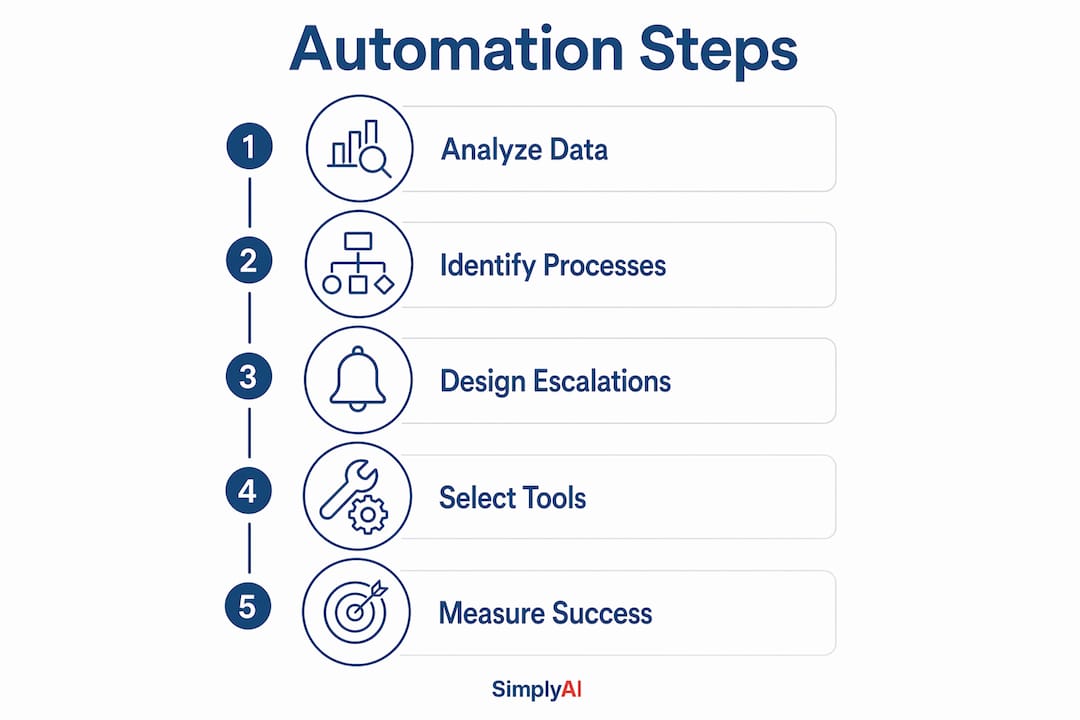
The most reliable method for selecting initial automation candidates is a structured analysis of your support data. Analyzing your top 10 inquiry types by volume over a 90-day period gives you a defensible, data-driven starting point rather than assumptions. This approach surfaces the categories where automation will generate the highest return with the lowest implementation risk.
The following sequence works well for most organizations approaching automation for the first time:
- Pull 90 days of ticket or contact data from your CRM or helpdesk platform, such as Salesforce, Zendesk, or Freshdesk, and sort by volume.
- Identify the top 10 inquiry categories and flag which ones have consistent, predictable resolution paths with no edge cases.
- Prioritize password resets, order status, account balances, and appointment scheduling as your first automation targets. These categories have clear inputs, clear outputs, and minimal variation.
- Exclude complex or emotionally charged cases from the initial rollout. Billing disputes, service failures, and complaints involving regulatory sensitivity should remain with human agents until your automation is proven.
- Map the resolution path for each selected category before writing a single conversation flow. Know what data the bot needs, where it retrieves it, and what a successful resolution looks like.
This process is covered in depth in Simplyai's guide on automating business support workflows, which walks through contact type selection and integration requirements for small and medium-sized businesses.
Pro Tip: Start with one category, not five. A single well-automated inquiry type that resolves correctly 85% of the time builds more organizational confidence than five mediocre automations running simultaneously.
How should you design escalation paths and human handoff?
Designing escalation paths before building conversation flows is the single most impactful decision in any automation project. Most teams do the opposite. They build the bot first and treat escalation as an afterthought. The result is trapped customers, context loss, and agent frustration when handoffs arrive without any background information.
A well-designed escalation system uses multiple triggers operating in parallel rather than relying on a single condition:
- Explicit human request: The customer directly asks for a human agent at any point.
- Sentiment detection: Negative sentiment signals, such as repeated expressions of frustration or urgency, trigger an automatic escalation review.
- Loop detection: If the bot fails to resolve the same intent after two or three attempts, the system escalates rather than cycling the customer through the same dead end.
- Material impact triggers: VIP accounts or high-value transactions above a defined threshold route directly to a senior agent, bypassing standard queues.
The handoff itself must preserve context. A warm transfer with a structured context packet gives the receiving agent the customer's name, account status, the issue they raised, what the bot attempted, and why escalation was triggered. The customer should receive an acknowledgment message confirming the transfer before the agent picks up. This eliminates the single most damaging element of automated support: asking the customer to repeat themselves.
"Treating escalation as a first-class design artifact is critical. Most automation efficiency lands in escalation definition and post-interaction workflow rather than bot conversation flow alone." — Zoom CX Leaders Guide
Pro Tip: Build a one-page escalation map before your first sprint. List every trigger condition, the data passed at handoff, and the agent queue it routes to. Review it weekly for the first month.
Simplyai's resource on AI escalation for SMBs provides a practical framework for structuring these handoff paths in real contact center environments.
What technology tools and integrations are essential?
Platform selection for automated customer support comes down to one factor above all others: integration depth. A chatbot that cannot read your CRM data, update your ticketing system, or route to your live agent platform in real time cannot resolve inquiries. It can only deflect them.
The table below compares the key capability dimensions to evaluate when selecting a platform:
| Capability | What to look for | Why it matters |
|---|---|---|
| CRM integration | Native connector, not just API documentation | Production-validated connectors resolve faster than theoretical APIs |
| Live agent routing | Direct queue handoff with context packet | Prevents context loss at escalation |
| Multi-channel support | Chat, voice, and email in one platform | Customers contact you across multiple channels |
| Sentiment analysis | Real-time detection during conversation | Powers multi-trigger escalation models |
| Reporting and analytics | Resolution rate, CSAT, and handle time dashboards | Enables weekly KPI tracking from day one |
Zoom Virtual Agent is one example of a platform that combines native CRM integration with live agent routing and multi-channel capability. Simplyai's AI automation and agent services are built on production-validated integrations with CRM, ticketing, and communication platforms, designed specifically for small and medium-sized businesses that cannot afford lengthy custom development cycles.
The difference between an API that theoretically connects two systems and a connector that has been tested in production at scale is significant. Always ask vendors for documented case studies showing resolution rates, not just feature lists.
How do you measure success in support automation?
Measurement starts on day one, not after 90 days. Tracking resolution-oriented KPIs weekly from the moment your automation goes live gives you the baseline data needed to calibrate performance before problems compound.
The five KPIs that matter most are:
- First-contact resolution rate: The percentage of contacts fully resolved without a follow-up. This is the primary indicator of automation quality.
- Self-service rate: The share of contacts resolved entirely within the automated system without human involvement.
- Average handle time: Tracks whether automation is reducing the time agents spend on contacts that do escalate.
- Customer satisfaction score (CSAT): Collected immediately after resolution, both automated and human-handled, to compare quality across channels.
- Agent utilization rate: Measures whether automation is freeing agent capacity for higher-value work or simply adding volume.
Containment rate does not belong on this list as a primary metric. A customer who abandons the bot after three failed attempts is technically "contained" but entirely unserved. Containment rate is a vanity metric that obscures real performance.
AI conversational analysis now enables evaluation of 100% of customer interactions against quality criteria, compared to the 1 to 3% manual sampling that was standard practice before AI-enabled quality assurance. ISO 18295-1 recognizes this method as valid for monitoring and measuring service quality in customer contact centers. This means you no longer need to sample. You can monitor every interaction and identify failure patterns at a granular level that was previously impossible.
Common mistakes in customer support automation and how to avoid them
The most costly mistake is over-escalation. Escalation trigger rates above 20% lead to agent fatigue and reduce the effectiveness of human oversight. The target range is 10 to 15%, reached through iterative calibration based on reviewer feedback after each deployment phase. Early deployments almost always over-escalate because teams set conservative thresholds for safety. That caution is appropriate at launch, but the thresholds must be tuned down as the system proves itself.
Context loss at handoff is the second most common failure point. When a customer explains their issue to a bot, gets transferred, and then must explain it again to a human agent, trust in the entire support system erodes. A structured context packet, as described in the escalation design section, eliminates this problem entirely when implemented correctly.
A third mistake is optimizing for volume reduction rather than resolution quality. Reducing inbound contact volume is a legitimate goal, but not at the cost of unresolved issues that generate repeat contacts. Repeat contacts are more expensive than the original inquiry and signal a broken resolution process. Track repeat contact rate alongside self-service rate to catch this pattern early.
Finally, ignoring quality assurance frameworks is a risk that grows as automation scales. AI-enabled quality assurance standardizes evaluation criteria and scales monitoring to every interaction, replacing limited manual sampling and increasing consistency across the entire contact center operation.
Key takeaways
Effective customer support automation requires resolution-focused design, multi-trigger escalation, production-grade integrations, and weekly KPI tracking from the first day of deployment.
| Point | Details |
|---|---|
| Start with data, not assumptions | Analyze 90 days of ticket data to identify the top 10 inquiry types before selecting automation candidates. |
| Design escalation before conversation flows | Define triggers, context packets, and routing paths before building any bot dialogue. |
| Choose integration depth over features | Production-validated CRM and live agent connectors drive resolution; theoretical APIs do not. |
| Measure resolution, not containment | First-contact resolution, self-service rate, and CSAT are the metrics that reflect actual customer success. |
| Calibrate escalation thresholds iteratively | Target a 10 to 15% escalation rate and adjust based on reviewer feedback after each deployment phase. |
Why automation design is really a human experience problem
After working with businesses across industries on AI automation projects, the pattern I see most often is this: teams invest heavily in the bot conversation flow and almost nothing in what happens when the bot fails. That imbalance is where most automation projects underperform.
The customers who escalate are, by definition, the ones the system could not help. They arrive at a human agent already frustrated, often having repeated themselves multiple times. If the handoff is clean, with full context and a warm acknowledgment, that frustration is recoverable. If the agent starts from scratch, the customer's experience of your brand is defined by that failure, not by the 80% of contacts the bot handled well.
I have seen organizations with technically sound automation achieve poor CSAT scores simply because their escalation design was an afterthought. Conversely, I have seen simpler automations with carefully designed handoffs generate loyalty scores that exceeded their pre-automation baseline. The technology is a means to an end. The end is a customer who feels heard and helped, whether by a machine or a person.
Continuous calibration matters as much as initial design. Simplyai's approach to conversational AI for customer service emphasizes iterative improvement cycles, not one-time deployments. The organizations that sustain automation gains are the ones that treat their systems as living products, not installed infrastructure.
— Theodor
Ready to automate your customer support with Simplyai?
Simplyai designs and implements AI-powered customer support systems built for small and medium-sized businesses that need measurable results, not proof-of-concept demos.

Simplyai's AI automation services cover the full implementation path: contact type analysis, escalation design, CRM and ticketing integration, and KPI dashboards configured from day one. For businesses that need to handle complex, multi-step support interactions with contextual escalation, Simplyai's AI agent solutions provide production-ready virtual agents that integrate directly with your existing systems. Every engagement starts with your data and ends with a system that resolves, not just deflects.
FAQ
What is customer support automation?
Customer support automation is the use of AI chatbots, large language models, and automated workflows to resolve customer inquiries without human intervention. It covers channels including chat, voice, and email, and is designed to handle high-volume, routine contacts autonomously.
What should I automate first in customer support?
Start with password resets, order status inquiries, account balance checks, and appointment scheduling. These categories have predictable resolution paths and represent the majority of inbound contact volume at most organizations.
Why is containment rate a misleading metric?
Containment rate measures whether a customer stayed in the automated system, not whether their problem was solved. A customer who abandons the bot after three failed attempts is contained but unresolved. First-contact resolution rate is a more accurate indicator of automation quality.
How do I prevent context loss during agent handoffs?
Use a structured context packet that passes the customer's name, account status, the issue raised, what the bot attempted, and the escalation trigger to the receiving agent. The customer should receive an acknowledgment message before the agent picks up.
What escalation rate should I target?
According to Zylos Research, the target escalation rate is 10 to 15%. Rates above 20% cause agent fatigue and reduce oversight effectiveness. Calibrate thresholds iteratively based on reviewer feedback after each deployment phase.