

TL;DR:
- Modern CRM automation extends beyond simple rules to AI-driven workflows, cross-system data synchronization, and end-to-end orchestration. This integrated approach reduces manual work, improves communication consistency, and enables scalable growth across customer lifecycle stages. Effective implementation requires strategic mapping, robust integration, and cross-departmental governance to prevent failures and maximize benefits.
Most businesses assume CRM automation means setting up a few rules inside their CRM software, like auto-assigning leads or sending a welcome email. That assumption is costing them growth. What is CRM automation in its modern form goes far beyond internal triggers and simple if-then logic. It encompasses AI-driven workflows, cross-system data synchronization, and end-to-end process orchestration that connects sales, marketing, finance, and customer service into a coherent operational backbone. This guide breaks down what CRM automation actually is, how it works in 2026, and what it takes to implement it in ways that deliver measurable results.
Table of Contents
- Key Takeaways
- What is CRM automation and how it works
- The real benefits of CRM automation for businesses
- From isolated automation to cross-system orchestration
- How to implement CRM automation effectively
- My take: orchestration changes everything
- How Simplyai can help you automate and orchestrate
- FAQ
Key Takeaways
| Point | Details |
|---|---|
| CRM automation defined | It uses technology to handle repetitive CRM tasks like data entry, lead nurturing, and follow-ups at scale. |
| AI changes the equation | Machine learning and NLP enable predictive insights, autonomous support, and hyper-personalized communication. |
| Orchestration beats isolation | Connecting CRM with ERP, billing, and marketing systems prevents data misalignment and broken handoffs. |
| Implementation requires planning | Mapping current workflows and defining scope before choosing tools determines whether automation succeeds or fails. |
| Partial automation often fails | Siloed automation inside a single CRM platform frequently breaks down at departmental boundaries. |
What is CRM automation and how it works
CRM automation uses technology to handle repetitive customer relationship management tasks, from data entry and lead nurturing to email campaigns and follow-up sequences, so that sales and service teams can focus on higher-value activities. IBM defines it as a direct response to the manual workload and operational inefficiencies that multiply as organizations grow. The more customers you manage, the more unmanageable the manual work becomes.
At its core, CRM automation works by triggering predefined actions based on customer behavior, data conditions, or time-based rules. A lead fills out a form; the CRM automatically creates a contact record, scores the lead, assigns it to the right rep, and sends a personalized outreach email. No human intervention required. This kind of workflow automation is the foundation, but it is only the starting point.
The technologies powering modern CRM automation have shifted dramatically. Virtual assistants and AI-powered tools now handle routine customer inquiries, qualify leads in real time, and deliver instant responses while continuously collecting behavioral data for personalization. Natural language processing (NLP) and machine learning sit underneath these capabilities, enabling the system to learn from past interactions and improve over time. This is not rules-based logic anymore. It is adaptive, context-aware automation.
AI-driven CRM integrates data across platforms to generate predictive insights, personalize communications at scale, and deploy autonomous customer support agents that resolve issues without routing them to a human. Platforms like Microsoft Dynamics 365 and Salesforce have made this a production-ready reality for businesses of all sizes. The common features that businesses encounter when implementing CRM automation include:
- Automated data entry and contact record creation from web forms, emails, and chat interactions
- Lead scoring and routing based on behavioral signals and firmographic data
- Drip email campaigns triggered by customer lifecycle stage or activity
- Follow-up reminders and task creation for sales representatives
- AI-generated response suggestions for customer service teams
- Real-time dashboards that aggregate pipeline and performance data
Pro Tip: Before selecting a CRM automation tool, audit your most time-consuming manual tasks first. The highest-ROI automation targets are almost always the repetitive, high-frequency activities your team does every single day.
Integration is where CRM automation either pays off or falls short. A CRM that operates as an isolated system cannot automate end-to-end processes. For automation to work across the full customer lifecycle, the CRM must connect to marketing automation workflows, support platforms, billing systems, and analytics tools. That integration layer is what transforms a CRM into a genuine operational asset.
The real benefits of CRM automation for businesses
The business case for CRM automation is not theoretical. Automation reduces manual tasks while improving the consistency and quality of customer communications, which allows teams to scale operations without proportionally increasing headcount. That combination of cost control and performance improvement is exactly why CRM automation adoption has accelerated so sharply.

Consider what happens to a sales team managing 500 active opportunities without automation. Reps manually log calls, update deal stages, write follow-up emails, and remind themselves to check in with prospects who have gone quiet. Critical opportunities fall through the gaps, not because reps are negligent, but because human memory and manual processes are not built to handle that volume reliably. Automation solves that problem structurally, not individually.
The core advantages of CRM automation for businesses break down into five concrete areas:
- Time reclaimed from repetitive work. Automated data entry, logging, and task creation eliminate hours of administrative work per week, per rep. That time shifts to selling and relationship-building activities.
- Consistent, personalized customer communication. Automated sequences deliver the right message at the right lifecycle stage, every time, without depending on individual memory or initiative.
- Scalability without proportional cost growth. As customer volume increases, automated workflows absorb the additional load without requiring equivalent headcount expansion.
- Real-time pipeline visibility. Automated data capture means pipeline reports reflect current reality rather than last week's manually entered updates, giving managers accurate information for faster decisions.
- Higher lead conversion rates. Salesforce's AI and CRM integration demonstrates how automated prospecting, hyper-personalized emails, and AI-driven lead engagement directly improve conversion and pipeline health.
Understanding why to automate CRM systems also means acknowledging the compounding effect. Each automated touchpoint generates data. That data feeds AI models. Those models improve the next automated interaction. Over time, the system becomes progressively more effective without requiring proportional human input.
Pro Tip: Track two metrics before and after implementing CRM automation: average time-to-first-contact on new leads, and the percentage of deals that receive a follow-up within 48 hours. These two numbers reveal how much value your automation is actually delivering.
The AI-powered customer engagement dimension is particularly significant for small and medium-sized businesses. Historically, personalized, timely customer communication at scale was a capability reserved for enterprises with large marketing and sales operations. CRM automation makes it accessible to businesses with lean teams, provided the implementation is done thoughtfully.
From isolated automation to cross-system orchestration
Here is where most CRM automation conversations get incomplete. The majority of tutorials and vendor marketing focus on automation within a single CRM platform. Set up a workflow. Automate a sequence. Score your leads. That is useful, but it represents only a fraction of what modern CRM automation can and should accomplish.
Celigo's 2026 guidance positions cross-system orchestration as the critical frontier for enterprise CRM success. Orchestration means connecting the CRM not just to internal workflows, but to the broader technology ecosystem the business runs on: ERP systems, billing platforms, ecommerce infrastructure, marketing automation, customer support tools, and financial systems. When a deal closes in the CRM, the ERP should automatically generate an invoice. When a subscription lapses in billing, the CRM should update the account status and trigger a renewal sequence. When a lead score crosses a threshold in marketing automation, the CRM should route that contact to sales immediately.
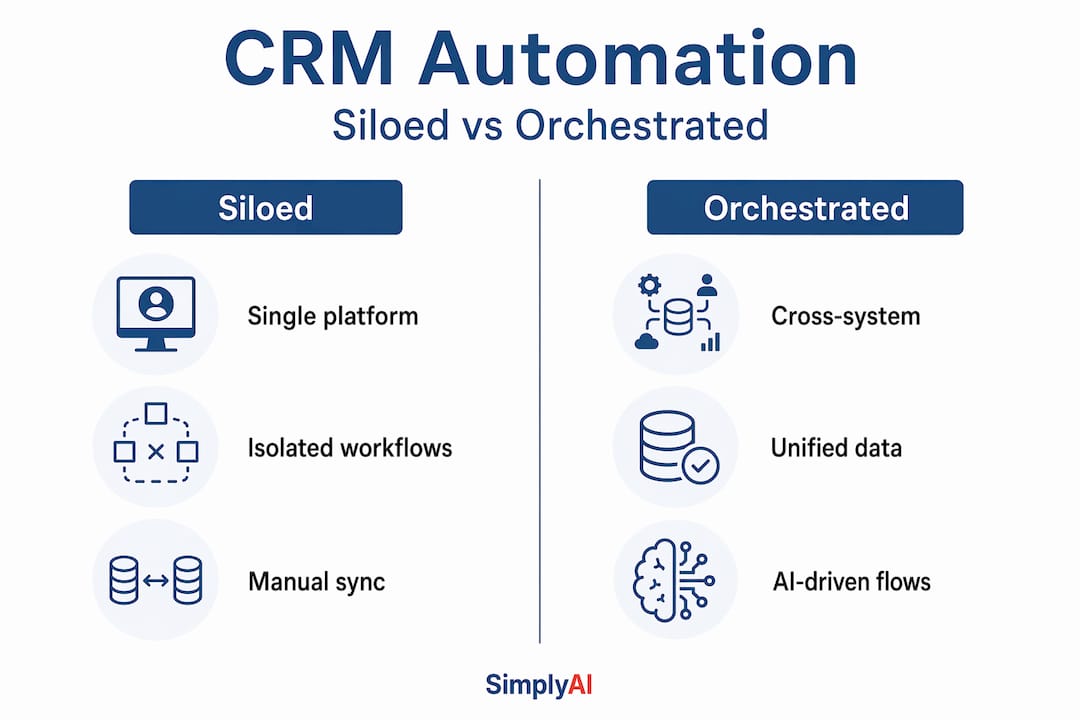
The contrast between siloed automation and orchestration is significant:
| Dimension | Siloed CRM automation | Cross-system orchestration |
|---|---|---|
| Scope | Single CRM platform | CRM + ERP + billing + marketing + support |
| Data consistency | Frequently mismatched across systems | Synchronized in real time across all platforms |
| Handoff reliability | Manual handoffs at system boundaries | Automated handoffs with audit trails |
| Customer experience | Inconsistent across touchpoints | Unified and context-aware throughout lifecycle |
| AI model quality | Limited by single-system data | Enhanced by multi-source, unified data inputs |
| Failure risk | High at departmental boundaries | Mitigated through integration governance |
Isolated automation inside CRM platforms creates predictable failure modes: mismatched statuses between systems, stale records that no longer reflect reality, and broken handoffs when a customer crosses from one department's system to another's. A prospect who closes as a customer in the CRM but remains an active lead in the marketing automation tool will continue receiving sales nurture emails. That kind of failure is not a minor annoyance. It erodes customer trust and signals organizational chaos.
ServiceNow's Autonomous CRM takes orchestration further by deploying AI agents that execute workflows end-to-end, reporting a 28% improvement in issue resolution time. That result is only achievable when automation spans systems, not when it operates within a single platform's boundaries.
How to implement CRM automation effectively
Knowing how to automate CRM processes well requires more strategic thinking than most vendors suggest. The technology is mature. The implementation discipline is where businesses succeed or fail.
Start by mapping your current workflows before touching any software. Identify where your team spends time on repetitive tasks, where data is entered manually into multiple systems, and where customer communications are inconsistent or delayed. This audit gives you a prioritized target list rather than a random collection of automation experiments.
The next decision is scope. Are you automating workflows inside your existing CRM, or are you orchestrating processes across multiple systems? That distinction determines your tool selection, integration requirements, and the governance structure you need to build. An AI workflow optimization guide can help smaller businesses think through this scoping exercise systematically before committing to a technology stack.
When selecting CRM automation tools, evaluate them on the following dimensions:
- Native AI capabilities, including lead scoring, predictive analytics, and generative content assistance
- Integration depth with your existing tech stack, including your ERP, billing, and support tools
- Workflow builder flexibility, meaning the ability to create complex, multi-step automations without writing code
- Data governance features, including audit logs, error handling, and rollback capabilities
- Scalability, so the automation architecture can grow as your process complexity increases
Common mistakes businesses make when approaching CRM automation include confusing the CRM software itself with automation capability, assuming that buying a CRM platform automatically delivers automation. It does not. Automation requires deliberate design. A second frequent error is ignoring the data alignment challenge across systems. Confusing CRM automation with CRM software or generic marketing tools leads organizations to underinvest in the integration work that determines whether automation actually functions end-to-end.
Pro Tip: Assign a clear owner to your CRM automation program, not a committee, and not "the IT team." Automation that spans sales, marketing, and finance requires someone with cross-departmental authority and accountability to make decisions and resolve conflicts quickly.
For businesses exploring how AI-powered CRM can transform their operations, starting with two or three high-frequency automation workflows and measuring their impact before expanding is consistently more effective than attempting a full-scale rollout from day one. AI agents in customer support, for example, represent a particularly high-impact entry point. AI-first customer support frameworks demonstrate how autonomous response handling reduces resolution times and improves customer satisfaction measurably, with relatively contained implementation scope.
My take: orchestration changes everything
I have worked with businesses at every stage of CRM maturity, from companies running entirely on spreadsheets to enterprises with six-figure annual CRM contracts. The pattern I see consistently is that partial automation creates a false sense of progress. A team automates their lead assignment and email sequences, sees a short-term lift, and then hits a wall six months later when the data between their CRM and billing system is out of sync and nobody knows which version is correct.
The honest truth is that most businesses underestimate the need for orchestration across systems. They build automation inside one platform and call it done. Then a customer who renewed three months ago still receives a lapse notification. A deal that closed last quarter still shows as "active" in the pipeline report. These failures do not come from bad tools. They come from treating CRM automation as a departmental problem rather than an organizational one.
What I have learned is that the businesses getting the most out of CRM automation are the ones who approach it with a cross-departmental mindset from the beginning. They map the full customer lifecycle before automating any single stage of it. They invest in integration infrastructure before they invest in AI features. And they build governance processes that keep data aligned as systems evolve.
The opportunity here is real and it is urgent. But capturing it requires thinking beyond the CRM platform and designing automation around the customer journey, not around the software category.
— Theodor
How Simplyai can help you automate and orchestrate
Implementing CRM automation that actually delivers results, rather than creating new operational complexity, requires both technical depth and strategic clarity. Simplyai works with businesses to design and deploy AI-powered automations that span CRM, marketing, sales, and customer support systems, including custom AI agents, workflow orchestration, and cross-system integrations tailored to your specific operations.

Whether you are starting from manual processes or looking to extend existing CRM automation into true cross-system orchestration, Simplyai builds solutions that reduce manual work and improve customer experience measurably. For teams that need to build internal capability alongside external implementation, the AI corporate education program equips your people to manage and scale automation confidently. The companies moving fastest on CRM automation right now are the ones treating it as a strategic priority, not an IT project.
FAQ
What is CRM automation in simple terms?
CRM automation uses technology to handle repetitive customer relationship tasks, like data entry, lead follow-ups, and email sequences, automatically, so teams can focus on higher-value work rather than manual administration.
Why automate CRM systems?
Automating CRM systems reduces human error, improves the consistency of customer communication, and allows businesses to scale their sales and service operations without a proportional increase in headcount or manual effort.
How does CRM automation work?
CRM automation works by triggering predefined or AI-driven actions based on customer behavior, data conditions, or time-based rules. Modern implementations also connect the CRM to external systems like ERP and billing platforms through integration orchestration.
What is the difference between CRM automation and CRM software?
CRM software is the platform that stores customer data. CRM automation refers to the workflows, AI capabilities, and integrations built on top of that platform to eliminate manual tasks and orchestrate processes across systems.
What are the biggest risks of partial CRM automation?
When automation is limited to a single CRM platform without cross-system integration, it frequently produces mismatched data, broken handoffs between departments, and stale records that undermine both customer experience and internal decision-making.