

TL;DR:
- Cognitive automation enables SMBs to interpret unstructured data, learn, and adapt, offering a competitive edge. It layers AI capabilities to handle complex, unpredictable workflows, reducing reliance on manual decision-making. Proper safeguards, strategic implementation, and measurable goals are vital for safe and effective deployment.
Most business owners assume automation means setting up a rigid workflow that follows the same rules every single time. That mental model made sense a decade ago, but it misses the seismic shift now underway in how AI-driven systems actually operate. Modern cognitive automation can imitate human reasoning, including decision-making and learning, which means it can handle messy, unpredictable business situations that traditional bots simply cannot touch. This guide explains exactly what cognitive automation is, how it works, and where it delivers the most practical value for small and medium-sized businesses ready to compete at a higher level.
Table of Contents
- Understanding cognitive automation: The next leap for SMBs
- How does cognitive automation work? Key components and workflow
- Cognitive automation vs. rules-based automation: What's the real difference?
- Practical uses for SMBs: From customer service to operations
- Safeguards, oversight, and best practices for effective deployment
- Why most SMBs underestimate the value and the risks of cognitive automation
- Ready to transform your business with cognitive automation?
- Frequently asked questions
Key Takeaways
| Point | Details |
|---|---|
| Adaptive automation | Cognitive automation surpasses traditional bots by interpreting and learning from unstructured data and dynamic inputs. |
| Business-critical value | It enables SMBs to automate complex workflows, not just repetitive tasks, delivering faster responses and better customer service. |
| RPA vs. cognitive | Unlike RPA, cognitive automation understands context, manages exceptions, and supports human-in-the-loop oversight. |
| Real-world readiness | Effective deployment requires robust safeguards, governance, and ongoing monitoring to prevent costly errors. |
| Start small, measure outcomes | SMBs get the best results by piloting automation on goals with clear outcomes and escalation paths. |
Understanding cognitive automation: The next leap for SMBs
Traditional automation, often called robotic process automation or RPA, executes precise, predictable tasks by following step-by-step rules. Move this file. Copy this field. Send this email. It works beautifully when the inputs are clean and the process never changes. The problem is that most real business situations are neither clean nor static.
Cognitive automation changes the equation entirely. It layers machine learning, natural language processing, and adaptive reasoning on top of automation frameworks, giving systems the ability to interpret context, learn from new data, and adjust their behavior without a human rewriting the rules every time something unexpected appears. As one leading overview notes, cognitive automation can interpret data, reason, and adapt by adding machine learning and NLP capabilities to process unstructured inputs, such as customer emails, scanned documents, or spoken service requests.
This matters enormously for SMBs because your customers don't communicate in structured database fields. They send emails with ambiguous requests. They submit support tickets that mix complaints with questions. They fill out forms inconsistently. A rules-based bot fails or routes everything to a human at the first sign of ambiguity. A cognitive system interprets, decides, and acts. Understanding AI reshaping enterprise operations helps frame why this capability shift represents a genuine competitive opportunity, not just a technology upgrade.
The shift also involves moving toward what practitioners now call agentic automation. Rather than one bot performing one task, cognitive platforms coordinate multiple AI agents that perceive inputs, reason about goals, and orchestrate complex workflows. This is why enterprise automation explained at the platform level looks very different from the simple scripts many SMBs currently run. The underlying cognitive automation platform layers reveal just how sophisticated these systems have become.
"The real power of cognitive automation is not that it replaces workers. It is that it replaces the need for humans to manage every exception, every ambiguity, and every one-off decision in a workflow."
How does cognitive automation work? Key components and workflow
To appreciate what cognitive automation actually does behind the scenes, let's walk through its key building blocks and practical execution.
Every mature cognitive automation platform operates through a layered architecture. Research confirms that cognitive automation is layered, moving from perception through understanding to reasoning, orchestration, and auditability. The table below summarizes each stage and what it means in practice.
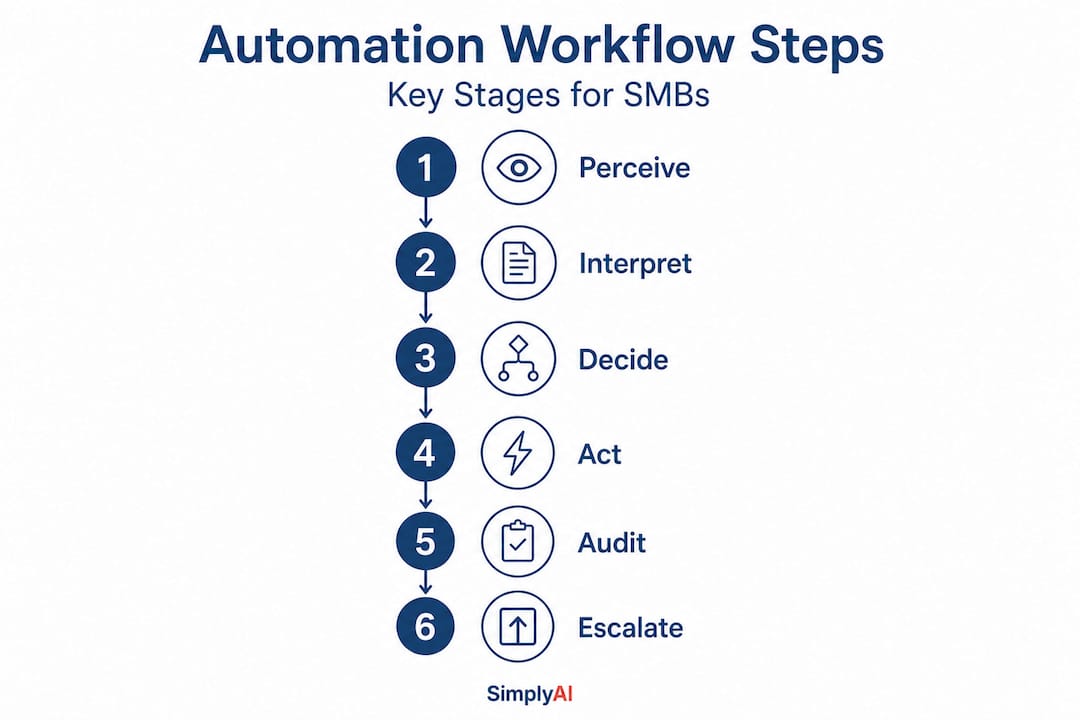
| Stage | Function | Example |
|---|---|---|
| Perceive | Ingest inputs: text, images, audio, structured data | Reading a customer email or scanned invoice |
| Understand | Parse meaning using NLP or computer vision | Identifying intent, urgency, and key entities |
| Reason / Decide | Apply logic, learned patterns, or LLM reasoning | Classifying ticket priority or recommending action |
| Orchestrate | Execute tasks across systems and workflows | Updating CRM, routing ticket, triggering response |
| Audit / Escalate | Log actions and hand off to humans when needed | Flagging edge cases for supervisor review |
This staged approach means cognitive automation handles far more than a simple if-then rule could ever manage. Consider a real-world scenario: a customer sends an email asking about a delayed order, mentioning frustration and threatening to cancel. A rules-based system might search for the word "cancel" and trigger a refund workflow. A cognitive system reads the full context, determines the customer actually wants reassurance and a tracking update, pulls the shipment data from the logistics API, and drafts a personalized response, all without a human touching it.
Here is how a typical cognitive automation workflow runs from start to finish:
- Data intake: The system receives an unstructured input, for example, a support request, a document upload, or a voice-to-text query.
- Pre-processing: NLP or computer vision components extract meaning, intent, and key entities from the raw content.
- Context matching: The reasoning layer compares the extracted meaning to known patterns, policies, or trained models to determine the correct course of action.
- Action execution: The orchestration layer carries out the decision, updating records, sending communications, or triggering downstream systems.
- Logging and audit trail generation: Every action is recorded with timestamps and decision rationale for compliance and quality review.
- Escalation protocol: If confidence falls below a defined threshold or the query is outside known parameters, the system flags the case and routes it to a human agent with full context attached.
Steps five and six are not optional extras. For AI decision-making in SMB workflows, audit trails and escalation paths are what separate a reliable production system from a prototype that occasionally embarrasses your brand.
Pro Tip: Before you deploy any cognitive automation touching real customers, map out every escalation scenario explicitly. Define confidence thresholds, assign human reviewers, and test edge cases until they no longer surprise you.
Cognitive automation vs. rules-based automation: What's the real difference?
With the technical foundation clear, the next step is understanding where cognitive automation stands apart from the rule-based automations most SMBs know.
The distinction is not just technical. It is strategic. RPA handles structured, rules-based tasks, while cognitive automation tackles dynamic, context-aware workflows. In practice, this shapes which problems each tool can actually solve.
| Dimension | Rules-based RPA | Cognitive Automation |
|---|---|---|
| Input type | Structured, consistent data | Unstructured or variable data |
| Flexibility | Low: breaks when inputs change | High: adapts to new patterns |
| Complexity handled | Simple, repetitive tasks | Multi-step, judgment-intensive tasks |
| Learning capability | None | Continuous learning from data |
| Human oversight | Minimal for routine tasks | Critical for exceptions and edge cases |
| Best use case | Data entry, file routing | Customer queries, document analysis, triage |
Understanding process automation advantages makes it clear that both approaches have genuine business value. The mistake is treating them as interchangeable. RPA is the right tool for payroll processing, where every input follows a defined schema. Cognitive automation is the right tool for classifying incoming leads from a contact form, where customers describe their needs in their own words.
The AI automation vs manual work question reveals another important nuance: cognitive automation does not necessarily eliminate human involvement. It reduces the volume of routine decisions humans must make, freeing them to focus on the cases that genuinely require human judgment. Reviewing secure AI automation tips alongside your deployment plan adds an additional layer of operational resilience.
Pro Tip: Run a small pilot for cognitive automation in one workflow where your current rules-based system frequently fails or requires manual intervention. Measure error rates and handling time before and after. That data will justify your broader investment.
Practical uses for SMBs: From customer service to operations
So, how does this translate into real improvements for your business? Let's examine where cognitive automation delivers the most value for SMBs today.
The application landscape is broader than most owners realize. Cognitive automation reduces response time and improves satisfaction in customer service and operations by interpreting queries, routing intelligently, and escalating when necessary. The most high-value scenarios for SMBs include the following.

Customer service chatbots powered by large language models can understand nuanced questions and provide accurate answers, not just trigger pre-written scripts. Intelligent ticket routing analyzes support requests and assigns them to the right team member based on content, not just keywords. Order handling systems that understand customers changing their mind mid-request, combining cancellation and rebooking into a single automated workflow. Lead qualification systems that read inbound inquiries, assess fit against defined criteria, and prioritize follow-up queues for sales teams. Automated report generation that pulls data from multiple sources, interprets trends, and produces narrative summaries ready for stakeholder review.
Choosing the right starting point matters. The best first workflow for cognitive automation is one where humans currently spend significant time interpreting ambiguous inputs before acting. Think of your support inbox, your lead intake process, or your document review queue. If a skilled employee must read and think before doing something, that is where cognitive automation creates the most leverage. Resources on AI-enhanced customer engagement and data-driven automation for SMBs provide additional frameworks for identifying those high-value targets. Practical automation examples for SMBs also illustrate how these principles look when deployed in real operating environments.
One important strategic pointer: resist the temptation to automate every workflow at once. SMBs that see the most durable results start with a single, well-defined use case, measure outcomes rigorously, and then expand. This creates institutional knowledge about how cognitive systems behave in your specific environment before you scale.
Safeguards, oversight, and best practices for effective deployment
While it's exciting to see what cognitive automation can do, it is equally vital to deploy it safely and keep control of your business processes.
Cognitive automation introduces failure modes that traditional software does not. A rules-based system either works or it breaks visibly. A cognitive system can produce plausible-sounding but incorrect outputs, handle edge cases inconsistently, or gradually drift in performance as real-world data patterns shift over time. These risks are manageable, but they require deliberate design choices.
Research on production AI evaluation confirms that evaluation must go beyond benchmarks to include handling unsupported queries, having safeguards, regression tests, and human oversight. That standard applies directly to SMB deployments. A clean benchmark score in a controlled test environment does not guarantee safe behavior when real customers send their messiest, most unpredictable requests.
Follow this deployment sequence for real-world readiness:
- Define scope and success metrics clearly before writing a single line of configuration. Know exactly what the system should and should not attempt to handle.
- Validate on representative data, not just ideal-case examples. Include the messiest, most ambiguous inputs your team currently struggles with.
- Build safeguards at every decision point: confidence thresholds, blocklists for sensitive topics, and hard boundaries for actions with irreversible consequences.
- Establish a human-in-the-loop review layer for edge cases, especially in early production weeks when the system is encountering real-world variance for the first time.
- Set up continuous monitoring dashboards to track decision accuracy, escalation rates, and user satisfaction over time.
- Run scheduled regression tests to confirm that model updates or configuration changes have not degraded performance on previously handled scenarios.
"The SMBs that deploy cognitive automation most successfully treat it as a living operational system, not a project with a launch date and a close date. Monitoring, tuning, and human review are permanent fixtures of the workflow."
The concept of retrieval vs reasoning in AI is also practically relevant here. Some queries require the system to retrieve specific factual information accurately. Others require it to reason across ambiguous context. Knowing which mode your automation relies on shapes how you validate it and where you place your safeguards. Guidance on intelligent automation in SMBs explores this operational dimension in depth.
Why most SMBs underestimate the value and the risks of cognitive automation
With best practices in mind, here is a frank view on what actually moves the needle for SMBs adopting cognitive automation.
The most common mistake is treating cognitive automation as a more powerful version of the simple bots businesses already run. It is not. The capabilities are genuinely different, and so are the responsibilities that come with deploying them. SMBs tend to focus heavily on the "smarts" because the demos are impressive. A system that reads an email and drafts a personalized reply feels almost magical. What gets less attention is the question of what happens when the system is wrong.
Edge cases are where reputational risk hides. A misclassified support ticket creates minor friction. An automated response that misinterprets a sensitive customer situation, a complaint about a health product, a billing dispute involving financial hardship, can cause real harm to your brand. The businesses that deploy cognitive automation sustainably are the ones that design for exceptions from day one, not as an afterthought.
The second underestimated factor is the importance of measurable outcomes. Many SMBs launch cognitive automation pilots with vague goals like "improve efficiency." That makes it nearly impossible to evaluate whether the system is actually delivering value or just generating activity. The strongest deployments tie every automation directly to a specific, quantifiable metric: average handling time, first-contact resolution rate, lead conversion speed, or cost per resolved ticket.
Exploring business automation for SMBs reveals that the companies seeing the most dramatic results are those that treat their automation infrastructure as a strategic asset requiring ongoing governance, not a one-time implementation project.
The opportunity is real. The path is clear. But the businesses that will outperform competitors are not just the ones that adopt cognitive automation fastest. They are the ones that adopt it most thoughtfully.
Ready to transform your business with cognitive automation?
Cognitive automation represents one of the most significant operational advantages available to SMBs right now. The gap between businesses that adopt it strategically and those that rely on outdated, rules-based systems is widening every month.

SimplyAI specializes in helping small and medium-sized businesses evaluate, design, and implement AI automation solutions that deliver measurable results from day one. Whether you need AI automations for SMBs that streamline your operations, purpose-built AI agent solutions that handle complex customer interactions autonomously, or AI corporate education to equip your team with the knowledge to govern these systems confidently, SimplyAI has the expertise to guide you at every stage. The right starting point is one well-chosen workflow, measured carefully, and scaled intentionally.
Frequently asked questions
What is the main advantage of cognitive automation for SMBs?
Cognitive automation allows SMBs to automate tasks that require interpretation and decision-making, not just repetitive rules, which directly improves operational efficiency and the quality of customer experiences. By interpreting queries and routing issues intelligently, these systems reduce response times and free human staff for higher-value work.
How does cognitive automation differ from RPA?
Cognitive automation uses AI to understand context and adapt its decisions dynamically, while RPA only follows pre-set rules and processes consistently structured data. As RPA handles structured tasks reliably, cognitive automation extends automation reach into the ambiguous, judgment-intensive territory where traditional bots break down.
Are cognitive automation tools difficult to implement for small businesses?
Cognitive automation solutions are increasingly accessible, particularly when businesses start with well-defined workflows that combine interpretable goals, clear outcomes, and escalation points to humans. Starting small and measuring carefully reduces both technical risk and investment required.
What safeguards are important for deploying cognitive automation?
Critical safeguards include exception handling protocols, human-in-the-loop review for edge cases, and continuous model monitoring to ensure real-world reliability over time. Rigorous evaluation must go beyond benchmarks to cover unsupported queries, regression testing, and active human oversight throughout the system's operational life.