

TL;DR:
- Automating customer support using AI, chatbots, and workflows allows companies to serve more customers quickly and cost-effectively. It enhances speed, consistency, and scalability, enabling round-the-clock assistance and handling demand surges without increasing staff. Proper balance between automation and human agents maintains service quality, trust, and customer satisfaction while supporting business growth.
Automated customer support is defined as the use of AI, chatbots, and workflow technology to resolve customer inquiries without requiring a human agent for every interaction. Business leaders who ask why automate customer support are really asking a more fundamental question: how do we serve more customers, faster, without proportionally growing headcount or costs? Platforms like Zendesk, Salesforce, and Simplyai have made this shift accessible to companies of all sizes. The answer lies in a combination of speed, consistency, and scalability that manual support simply cannot match at volume.
What are the main benefits of automating customer support?
Customer support automation delivers measurable advantages across speed, cost, and quality. Understanding each benefit helps leaders prioritize where to invest first.
- Faster response and resolution times. Customers who receive prompt issue resolution are nearly twice as likely to repurchase. Speed is not just a convenience metric. It directly drives revenue.
- 24/7 availability across every channel. Round-the-clock availability is now a baseline customer expectation, not a premium feature. Automation makes it achievable without night shifts or overtime costs.
- Consistency and accuracy in every response. AI systems apply policies uniformly without fatigue, mood variation, or knowledge gaps. Customers receive the same correct answer whether they contact you on a Monday morning or a holiday weekend.
- Scalability during demand surges. Automation helps companies scale without proportional increases in headcount or costs. A product launch or seasonal spike no longer requires emergency hiring.
- Reduced costs and optimized resources. Deflecting routine tickets through self-service portals and chatbots cuts the cost per interaction significantly. Those savings compound as volume grows.
- Improved employee satisfaction. Automation reduces mental overload for agents by removing repetitive, low-value tasks. Agents freed from answering the same password reset question fifty times a day can focus on complex, empathetic problem-solving.
Pro Tip: Start by auditing your top ten most frequent support tickets. If any of them follow a predictable pattern with a consistent answer, those are your first automation candidates. Most teams find that 30–40% of their volume fits this profile.
How does customer support automation work in practice?
Customer support automation works by combining AI models, rule-based logic, and integrations to handle inquiries from first contact through resolution. The process is more structured than most leaders expect.
- A customer submits a request. This arrives via chat, email, social media, or voice. The automation layer intercepts it before it reaches a human queue.
- The system classifies the inquiry. AI tools answer frequent questions, route complex requests, and flag urgent issues, improving both customer and employee experience. Classification happens in milliseconds using large language models trained on your product and policy data.
- Routine queries are resolved automatically. A chatbot or self-service portal delivers the answer directly. Order status, return policies, account changes, and FAQ responses fall into this category for most businesses.
- Complex cases are escalated to human agents. The system passes the full conversation context, the customer's history from the CRM, and a priority score to the agent. The agent starts informed, not from scratch.
- The interaction is logged and analyzed. Every automated and human interaction feeds back into the system. Over time, the AI improves its classification accuracy and the knowledge base grows more complete.
Simplyai builds these workflows for small and medium-sized businesses using AI agent frameworks that connect to existing CRM and ticketing systems. The result is a support operation that handles high volume without adding headcount. For a deeper look at how conversational AI delivers reliable support, the architecture behind these systems is worth understanding before you build.
What are the common methods and tools for automating support?
Several distinct methods exist for automating customer service, and the right combination depends on your support volume, channel mix, and customer expectations. The table below compares the most widely used approaches.

| Method | Best Use Case | Example Tools |
|---|---|---|
| AI chatbots and virtual assistants | High-volume FAQ and transactional queries | Simplyai, Zendesk AI |
| Interactive voice response (IVR) | Phone-based support triage and routing | Salesforce Service Cloud |
| AI-powered CRM automation | Personalized follow-ups and case management | Salesforce, Simplyai |
| Knowledge bases and self-service portals | Customer self-resolution without agent contact | Zendesk Guide |
| Automated ticket routing and tagging | Prioritizing and directing inbound requests | Zendesk, Simplyai |
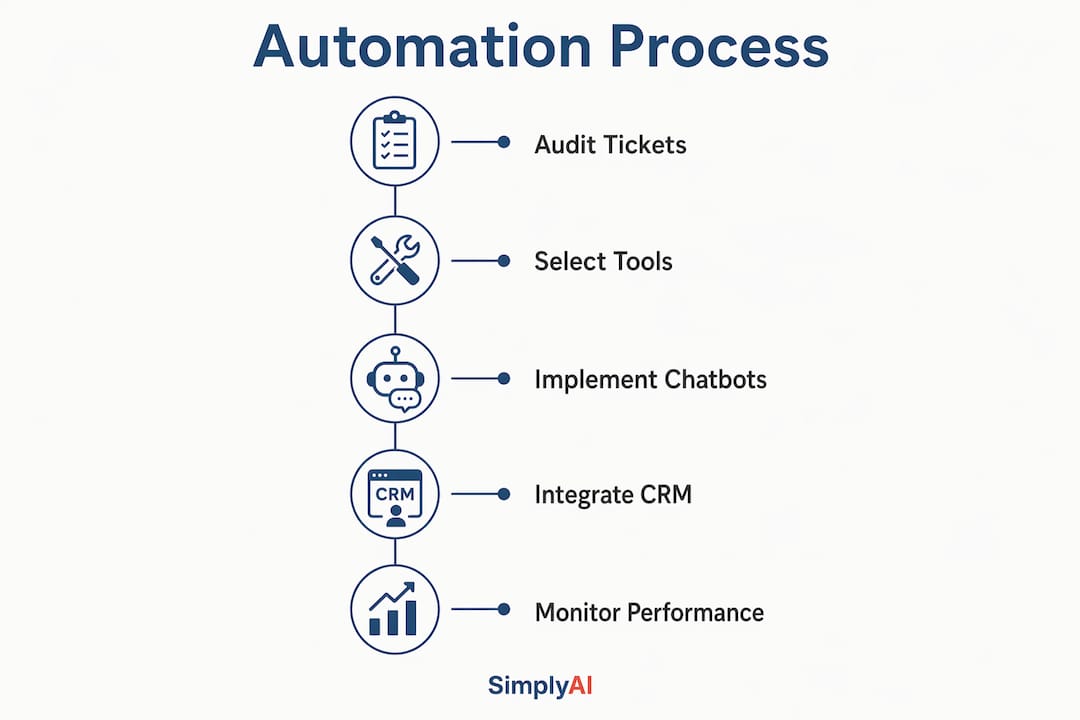
Automated ticket routing, AI chatbots, and self-service portals are the most common starting points for businesses new to automation. They address the highest-volume, lowest-complexity interactions first, which is where the fastest return on investment appears. Salesforce Service Cloud and Zendesk dominate the enterprise segment, while Simplyai offers tailored implementations for companies that need custom integrations without enterprise-level complexity or cost.
The benefits of AI chatbots extend beyond simple FAQ deflection. Modern chatbots built on large language models can handle multi-turn conversations, process returns, update account details, and hand off to agents with full context preserved. That capability gap between rule-based bots and AI-native chatbots is significant and growing wider in 2026.
AI-powered CRM integration adds another layer of value by connecting support interactions to the full customer record. When a customer contacts support, the system already knows their purchase history, previous tickets, and account tier. That context allows automation to personalize responses and route high-value customers to senior agents automatically.
How do you balance automation with human support?
Automation works best as a force multiplier for your human team, not a replacement for it. The businesses that get this balance right see the strongest results in both efficiency and customer loyalty.
- Avoid over-automation. Routing every inquiry through a bot before allowing human contact frustrates customers with complex or emotional issues. Set clear escalation triggers based on sentiment analysis, issue type, and customer tier.
- Maintain human oversight. Agents should review automated responses regularly, especially for edge cases. AI systems trained on outdated policies will give wrong answers confidently. Oversight catches drift before it damages trust.
- Preserve brand voice through automation policies. Automation ensures consistent application of policy rules without human variability. That consistency is an asset, but only if the policies themselves reflect your brand accurately. Audit your automation scripts quarterly.
- Train agents for the work automation cannot do. As routine tasks shift to AI, your human agents need stronger skills in de-escalation, complex problem-solving, and relationship management. Invest in that training deliberately.
- Monitor performance metrics continuously. First-contact resolution rates, customer satisfaction scores, and escalation rates tell you whether your automation is helping or creating friction. Higher FCR rates and reduced customer effort are the clearest signals that automation is working correctly.
Pro Tip: Build a "human-in-the-loop" review process for your first 90 days of automation. Flag every escalation and every negative satisfaction score. The patterns you find will tell you exactly where to refine your automation logic before it becomes a customer experience problem.
The customer engagement efficiency gains from well-balanced automation are substantial. Companies that treat automation as a complement to human judgment, rather than a substitute for it, build support operations that scale without losing the trust customers associate with their brand. Reducing operational costs with AI is a real outcome, but it requires this balance to be sustainable over time.
Key takeaways
Customer support automation delivers its strongest results when AI handles routine volume, human agents focus on complex cases, and both layers are connected through a well-integrated system.
| Point | Details |
|---|---|
| Speed drives revenue | Customers who get fast resolutions are nearly twice as likely to repurchase, making response time a direct business metric. |
| Automation scales without headcount | AI handles demand surges without emergency hiring, keeping cost per interaction low as volume grows. |
| Consistency is a competitive advantage | Policy-driven automation removes human variability, giving every customer the same accurate answer every time. |
| Balance prevents customer frustration | Clear escalation triggers and human oversight keep automation from damaging trust on complex or emotional issues. |
| Start with high-volume, low-complexity tickets | Auditing your most frequent inquiries identifies the fastest ROI opportunities before committing to a full platform. |
Automation is not a cost play. it is a growth strategy.
Most leaders I work with frame the automation decision as a cost reduction exercise. That framing is understandable, but it leads to underinvestment in the wrong places. The real value of customer support automation is not what it saves. It is what it makes possible.
When your support operation can handle ten times the volume without ten times the staff, you can enter new markets, launch new products, and serve new customer segments without the operational drag that kills growth at scale. Automation as a long-term driver of operational efficiency and trust is the more accurate frame, and the businesses that adopt it early build a structural advantage that is genuinely hard to replicate.
The fear I hear most often is loss of control over brand voice. Leaders worry that a chatbot will say something off-brand or handle a sensitive situation badly. That fear is legitimate, but it points to a training and governance problem, not an automation problem. A well-configured AI system with clear escalation rules and regular audits is more consistent than a team of twenty agents with varying experience levels and energy on a given day.
The other misconception worth addressing is that automation is only for large enterprises. Simplyai works specifically with small and medium-sized companies, and the ROI for those businesses is often faster and more visible than it is for large organizations with complex legacy systems. A 50-person company that automates its top 40% of support tickets does not need to hire its next two support agents. That is a concrete, immediate impact on the business.
The future of customer service is not fully automated. It is intelligently divided, with AI handling what it does best and humans doing what only humans can do. The companies that figure out that division now will be significantly better positioned in three years than those still debating whether to start.
— Theodor
Ready to automate your customer support?
Simplyai designs and implements AI-powered support automation for businesses that want measurable results without enterprise-level complexity. From AI chatbots that handle your highest-volume inquiries to full CRM and ticketing integrations, Simplyai builds systems that fit your existing workflows and scale with your growth.

Whether you are starting with a single chatbot or building a complete AI automation system for your support operation, Simplyai delivers practical solutions tailored to your business. The path from manual, reactive support to a consistent, always-on customer experience is shorter than most leaders expect. Explore what Simplyai can build for your team and take the first step toward a support operation that grows with your business.
FAQ
Why automate customer support instead of hiring more agents?
Automation handles high-volume, routine inquiries at a fraction of the cost per interaction, while human agents focus on complex cases that require judgment and empathy. Scaling through automation is faster and more cost-effective than proportional headcount growth.
What types of inquiries are best suited for automation?
Inquiries with predictable patterns and consistent answers, such as order status, return policies, password resets, and account updates, are the strongest candidates. These typically represent 30–40% of total support volume for most businesses.
How does automation affect customer satisfaction?
Customers who receive prompt resolutions are nearly twice as likely to repurchase, making speed a direct driver of satisfaction and revenue. Automation improves satisfaction when it resolves issues quickly and escalates complex cases to humans without friction.
What is the difference between a rule-based chatbot and an AI chatbot?
Rule-based chatbots follow fixed decision trees and fail when a customer's question falls outside the script. AI chatbots built on large language models handle multi-turn conversations, interpret intent, and adapt to varied phrasing, making them significantly more effective for real-world support volume.
How long does it take to implement customer support automation?
Implementation timelines vary by complexity, but most businesses see their first automated workflows live within four to eight weeks when using a purpose-built platform. Customer retention automation and CRM integrations typically add time but deliver compounding value over the following months.